

Fix 80% of tickets from your desk. Diagnose the rest before you drive.
SmartHomeEntry gives you remote access to every client's Home Assistant / Domoticz web panel - plus alerts, availability history and PDF reports. You handle config, automations, updates and reloads remotely. Hardware failures still need a site visit, but you know before you get in the car.
Compatible with popular systems
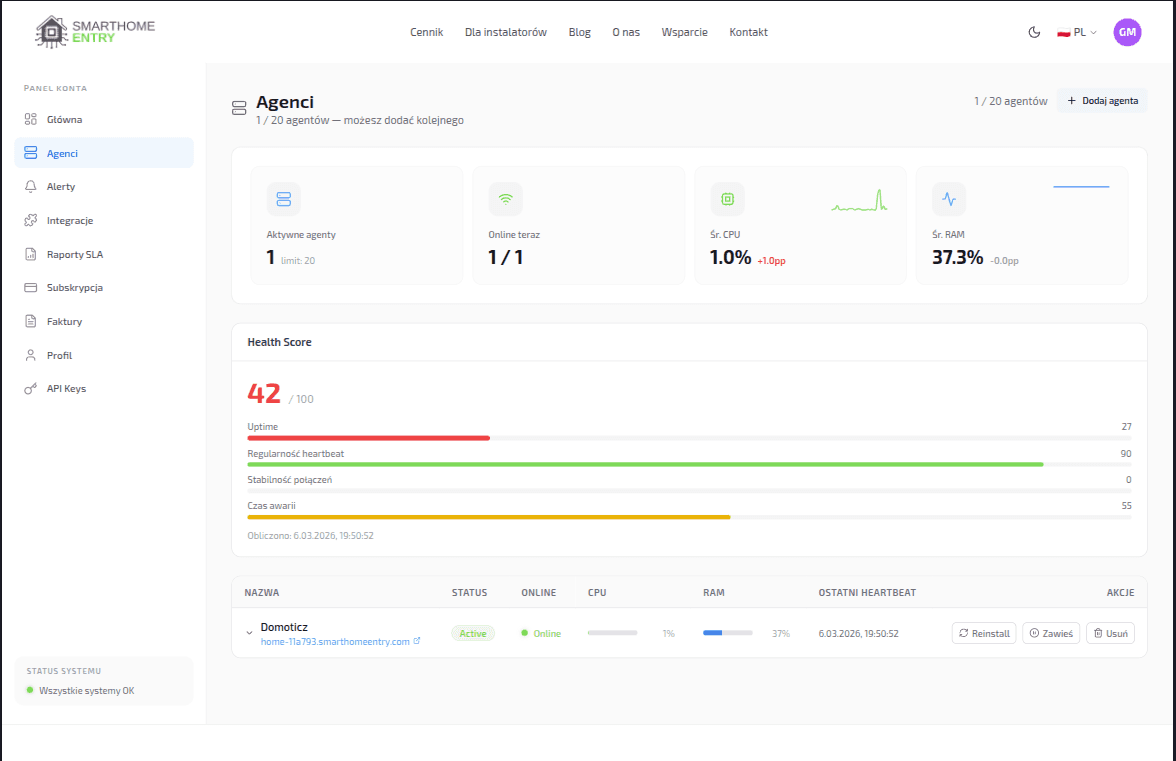 Live device statusOutage alerts
Where you bleed money every day
Every ticket costs you 2 hours on average - even when the fix is a single click.
2h gone → config reload
8 in 10 tickets are automation or integration. You click Reload and the problem is gone.
+120 min wastedNo diagnosis
You drive blind. Hardware, software, or network? No idea before you arrive.
+ cost + timeNo availability data
Client says "it's not working". You have no data to push back.
↓ trust lostFrom an alert to a closed ticket
What you actually get
An honest list: what you do from your desk, and where the tunnel still gives you an edge when you have to drive
Client panel, like you're on-site
Open the client's Home Assistant / Domoticz / OpenHAB straight from your dashboard. Edit automations, reload config, install add-ons, read logs - as if your keyboard were in their living room.
Remote accessAlerts before the client calls
Heartbeat every 60 s, the dashboard shows offline after 3 min, the built-in email alert goes out after 15 min. Pro adds your own rules from 5 min, Business from 1 min, both with a webhook into your ticketing system. You often know about an outage before the client picks up the phone.
ProactiveDiagnose before the drive
Tunnel responds, HA returns 502? Software issue - stay at your desk. Tunnel completely dead? Hardware: SD card, PSU, client's router. Drive out with the right part, not with the whole warehouse.
Drive smartAvailability history and report
The dashboard records every online and offline transition of each service (30 days). On the Business plan you download a PDF for the last 30 days: availability percentage, average downtime, reconnect count and incident list. It is a measurement report, not an availability guarantee.
PDF report (Business)Many clients in one panel
Pro: 5 services. Business: 20. Enterprise: 100. Each service is a separate tunnel with its own subdomain. No more juggling 15 VPNs and tabs - one list with health score and last contact.
Scale without chaosDiagnosis of the service on site
The agent reports whether the local service responds and which ports are listening. If the address is wrong, the dashboard suggests the right port. You know whether the network, the agent or the app itself is down.
Less guessingFrom signup to full control in 4 steps
Installation at the client takes about 2 minutes. No network configuration, no open ports.
Convinced?
Plans from $24/mo - setup with one command, cancel anytime.
No VPN · Zero open ports · No long-term contracts
kowalski.smarthomeentry.com
nowak.smarthomeentry.com
wisniewski.smarthomeentry.com
Secure connection.
Zero open ports.
Multi-tenant with isolation
Each client gets a separate tunnel with a dedicated SSH key pair and subdomain. Port-level isolation (127.0.0.1) - zero cross-tenant access.
Uptime metrics and health score
Automatic health score 0-100 based on availability, heartbeat regularity, reconnect count and outage length. On Business, an availability report PDF for clients.
Outbound-only architecture
The agent opens an outbound SSH connection - zero open ports and zero forwarding on the client's router. The tunnel is encrypted with SSH-2 (Ed25519), the browser side uses a Let's Encrypt certificate.
How much will you save with SmartHomeEntry?
Move the sliders to see how quickly the Pro plan pays for itself
Your monthly savings
Saved on travel
120 $
3/4 trips remote
Pro plan cost
-25 $
Pro / mo
Net profit
+95 $
/ mo
Plan pays off in
7 days
No contracts. Cancel anytime.
Plans for Installers
Pro and Business - designed for multi-site work
SmartHomeEntry Pro
$24 / mies.
- Up to 5 services
- Email and webhook alerts, rules from 5 min
- CPU / RAM monitoring
- Back-online alert
- Email support (within 48h)
SmartHomeEntry Business
$60 / mies.
- Up to 20 services
- Availability report PDF (30 days)
- REST API (status read)
- Alert rules from 1 min
- Priority support
SmartHomeEntry Enterprise
$240 / mies.
- Up to 100 services
- Everything in Business
- Availability report PDF (30 days)
- REST API (status read)
- Priority support
Installer FAQ
Yes. The Pro plan covers 5 services, Business 20, Enterprise 100. Each service is a separate tunnel with a unique subdomain. You see them all in one account; there are no sub-accounts for technicians yet.
It depends on the client's system: on Home Assistant OS you install our add-on and paste a token, on a Raspberry Pi or other Linux you paste one command, in Docker you start one container. About 2 minutes, no changes to the client's router. Instructions for every method: smarthomeentry.com/en/install.
Yes. Every plan gets the built-in offline alert after 15 min of silence. Pro and Business set their own threshold - from 5 min on Pro, from 1 min on Business - plus a webhook into your ticketing system.
On the Business and Enterprise plans, open the Availability reports tab in the dashboard and click Download PDF. The report covers the last 30 days and all services on the account: availability percentage, average downtime, reconnect count, health score and incident list. The report is in Polish. It records measurements - it is not an availability guarantee (see the Terms).
Straight answer: we're a tunnel to the HA / Domoticz / OpenHAB web panel, not a shell into the host OS. When HA crashes completely (OOM, kernel panic, SD card failure), the panel returns 502 and you have to drive out. Same for dead client routers, Raspberry PSUs, or failed NAS disks. BUT: you'll know about it from an alert before the client calls, and a 10-second tunnel check tells you whether it's software (stay at your desk) or hardware (drive - with the right part, not the whole warehouse). In practice you'll close ~80% of tickets remotely; the remaining ~20% still need a truck roll, but you're no longer driving blind.
Yes. Home Assistant OS: the SmartHomeEntry add-on from our repository (github.com/szyderca84/SmartHomeEntry-HA-Addon). Docker: the smarthomeentry/smarthomeentry-agent image. Raspberry Pi, NUC, Debian, Ubuntu: a package with a systemd service installed with one command. Instructions for every method: smarthomeentry.com/en/install.
Yes - a parallel migration with no downtime. Install the SmartHomeEntry agent next to the existing tunnel, check that the subdomain works, and only then switch off the old mechanism. The client won't notice a gap. With many clients, write to us - we'll help you plan the order.
The REST API (Business and Enterprise) is read-only: list of services, online status and metrics, limited to 30 requests per minute per user. The alert webhook (from Pro) sends a POST with JSON: tunnel ID, name, subdomain, event type and time. If your endpoint fails, we retry once after 2 seconds.

Start managing clients with SmartHomeEntry!
Create an account and connect your first installation. Cancel anytime.